A great many business applications were built on CodeIgniter 2 or 3, and many of them still do their job. The question owners ask is not whether the code is good. It is whether it is safe to keep running as PHP moves on, and what it will cost to deal with.
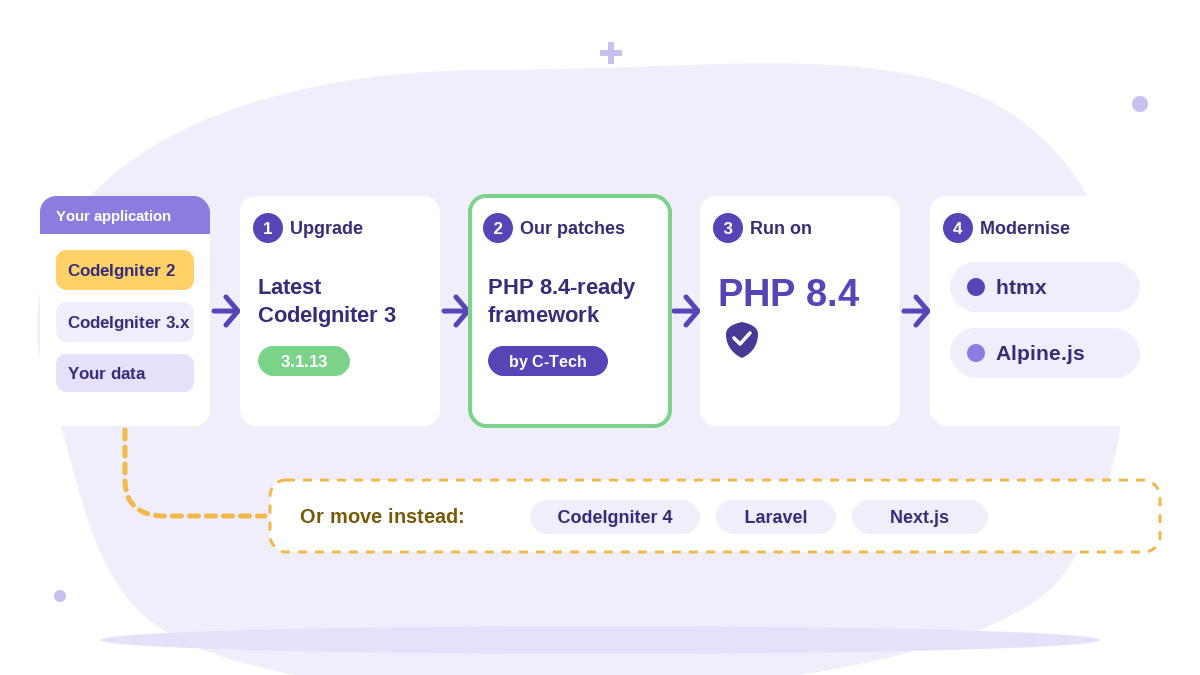
This is work we specialise in. Our answer for most of these applications is a path, not a rebuild: bring the application up to the latest CodeIgniter 3, switch it onto a CodeIgniter 3 framework that we have patched for PHP 8.4, get the application itself running on PHP 8.4, and, where it helps, give it an app-like front end with htmx and Alpine.js. It is also usually the cheapest way to end up on a supported PHP version. This article explains each step, what you get, how to keep the cost down, and when a different route is the better choice.
What the CodeIgniter project says
The official CodeIgniter download page is direct about the two versions. CodeIgniter 3 is "the legacy version of the framework, intended for use with PHP 5.6+", in maintenance and "receiving mostly just security updates", with 3.1.13 as the current release. CodeIgniter 4 is described as the latest version, intended for PHP 8.1 and above, including 8.4.
Two things follow. First, the CodeIgniter 3 page does not list PHP 8.4 as supported. The official changelog records work for PHP 8.0 and 8.1 compatibility in 3.1.12, dates 3.1.13 (the current release) to 3 March 2022, and does not mention PHP 8.2 or later anywhere. Second, running CodeIgniter on a recent PHP version is something you do and test yourself, not something the framework promises. That gap is exactly the work we do.
The good news is on the upgrade side. The CodeIgniter user guide has an upgrade page for every release, from 1.6 through 2.x and 3.0 up to 3.1.13. Getting to the latest CodeIgniter 3 is a documented path, not guesswork.
For context on why the PHP version matters, see when to modernise a PHP application: PHP only patches security problems in supported versions.
The path we recommend, in four steps
Step 1: Upgrade to the latest CodeIgniter 3
If you are on an older CodeIgniter 3 release, the work is a series of small, documented steps up to 3.1.13. If you are on CodeIgniter 2, the largest single step is the move to 3.0, and the official 2.2.x to 3.0.x guide lists what it involves:
- Replace the framework files. Take the site offline, delete the old
systemfolder, put the new one in its place and replaceindex.php. The guide warns that a plain copy and paste may cause problems. - Rename your class files. From version 3, every library, driver, controller and model file
must start with a capital letter, so
welcome.phpbecomesWelcome.php. - Update a few configuration files. The mime-types file is replaced, and the old
$autoload['core']setting is removed. - Move any overrides of the Log class into the application's
corefolder. - Rework session handling. The Session library was completely rewritten in version 3. It now uses server-side storage drivers instead of cookies as storage, and the session table's columns changed.
None of that is exotic, and most of it is mechanical. The risk is in the details: custom code that relied on the old behaviour, and the session change, which affects anyone who is signed in during the cut-over. We do the upgrade on a separate copy and test it before the live site moves.
Doing this first puts the application on the final CodeIgniter 3 release, so everything after it targets one known baseline.
Step 2: Switch to C-Tech's PHP 8.4-ready CodeIgniter 3
This is the step that sets our approach apart, and the one that saves you money.
The stock CodeIgniter 3 framework does not run cleanly on PHP 8.4. The problems are in the
framework's own system folder, which is shared code that is the same in every CodeIgniter 3
application. We have changed that framework to support PHP 8.4, so your application does not
pay for those fixes to be rediscovered one warning at a time. We replace the stock system
folder with our patched one. What the patches cover:
| What breaks in the stock framework | Introduced in | The fix |
|---|---|---|
| Creating properties that were never declared. CodeIgniter's base classes (controllers, models, the loader, the database driver) rely on this | PHP 8.2 | Declare the missing properties, and mark the base classes with the #[\AllowDynamicProperties] attribute, as the PHP manual describes |
Parameters whose default is null but whose type does not say so, such as array $params = NULL | PHP 8.4 | Make the type explicitly nullable: ?array $params = NULL |
The old E_STRICT error level, still referenced in the framework's error handling | Removed in PHP 8.4 | Stop referencing the constant; use the numeric level where one is still needed |
The framework setting session options at run time (session.use_trans_sid, session.use_only_cookies) | Deprecated in PHP 8.4 | Only write a setting when its current value differs |
mysqli::ping(), used to check that the database connection is alive | Deprecated in PHP 8.4 | Check the connection with a lightweight query instead |
xml_set_object(), used by the XML-RPC library | Deprecated in PHP 8.4 | Pass the handlers as explicit object-and-method pairs |
A mysqli result-type constant, MYSQLI_TYPE_INTERVAL, that no longer exists | Removed in PHP 8.4 | Remove it from the framework's type map |
"${variable}" inside strings, in the XML-RPC server | Deprecated in PHP 8.2 | Write "{$variable}" |
Passing null to string functions, floats where integers are expected, and non-strings to ctype functions, found in the framework's helpers and database layer | Deprecated in PHP 8.1 | Cast or guard the value |
Most of those are in the PHP manual's own lists for 8.4, 8.2 and 8.1.
There is one trade-off worth stating plainly. Once the framework's own folder has been patched, it is no longer the stock download. If CodeIgniter 3 ships another security release, the patches and the release have to be merged by hand. We keep the patches documented and in version control for that reason, so a future release can be applied without losing them.
Step 3: Make your application run on PHP 8.4
The framework is now ready. What remains is your own code, which is specific to your application. The pattern is smaller and more predictable:
- Optional parameters declared before required ones (deprecated since PHP 8.0): drop the default values that never had any effect.
null, floats and non-strings passed to built-in functions in your own controllers, models and views (deprecated in PHP 8.1)."${variable}"inside strings in your own code (deprecated in PHP 8.2).- Third-party packages that need updating to versions supporting the target PHP.
- Error-reporting settings in the entry point, which differ by PHP version.
- Testing every path the application takes on a test copy, with error logging at its strictest. Warnings that are hidden in production show up there.
None of the individual fixes is difficult. The effort depends on how much custom code you have, which is why we look at the application before quoting. Because the framework work is already done in Step 2, this step is usually where most of your own project cost sits, and it scales with your code, not with the framework.
Step 4: Add htmx and Alpine.js for an app-like front end
A CodeIgniter application renders pages on the server, which is a strength: it is simple, fast and easy to maintain. What older applications often lack is the feel people now expect: updating part of a page without a reload, dialogs, filters that respond instantly.
htmx and Alpine.js add that to a server-rendered application without turning it into a separate JavaScript project. htmx swaps parts of a page with HTML the server already knows how to produce, and Alpine.js handles small pieces of interface behaviour. The application stays a single codebase on the same framework. We use the same approach on this website, and wrote up what it is like in production, including where it stops working, in htmx and Alpine.js in production.
This step is optional, and you can do it later. It is the difference between an application that has been kept alive and one that feels current, at a fraction of the cost of rebuilding the front end in React.
What you get
- A supported PHP version, so security fixes keep arriving. See the version table on our PHP upgrade and application modernisation page.
- Your application, your data and your users' habits kept. Nothing is re-entered and nobody relearns the system, because the screens and workflows you rely on stay as they are.
- Little disruption. The work is done on a separate copy and tested before the live site moves across.
- No lock-in to us. It is still ordinary CodeIgniter 3 code on PHP, which any competent PHP developer can read, and the changes are documented.
- A modern feel where you want it, through htmx and Alpine.js, without a rewrite.
- Time to decide. You are on a supported version while you work out whether a bigger move is justified.
If your budget is tight
Cost is usually the deciding factor, and this path suits a tight budget for plain reasons. We quote no percentages here, because the size of the work depends on your code, but this is where the saving comes from and how to keep the bill down.
- You are not paying for a rebuild. A rebuild recreates functionality that already works. This path changes only what newer PHP versions break, and keeps everything else.
- You are not paying to rediscover the framework fixes. The framework patches in Step 2 exist already, so the work that is the same in every CodeIgniter 3 application is not billed as new research.
- You can stop after any step. Steps 1 to 3 get you onto a supported PHP version. Step 4 is optional and can wait until money allows. Nothing later depends on paying for it now.
- Defer the big decision, not the safety fix. If you may eventually want CodeIgniter 4, Laravel or Next.js, you can still do so later. Doing the path first means you are not running an unsupported PHP version in the meantime, and the cost of the larger move is not rushed.
- Avoid paying for extended support indefinitely. Some vendors sell security patches for end-of-life PHP versions. That can buy time, but it is a recurring cost that does not fix the application's age. Upgrading once is usually cheaper than renting support for years.
- Start with a review, then phase the work. Knowing exactly what you have lets you fix it in stages, and agree a fixed price for each well-defined stage so you know the cost before it starts. Open-ended work that is still being scoped is billed hourly until it is not, as on all our projects.
- Do the free checks yourself first. Your PHP version, your CodeIgniter version and whether your host offers PHP 8.4 are things you can find out today, and they shorten the review.
Why us
- It is a specialty, not a side line. We upgrade CodeIgniter 2 and 3 applications, make them run on PHP 8.4, and add htmx and Alpine.js, and we have taken a production CodeIgniter 3.1.13 application through exactly this path.
- We know the framework from the inside, because the PHP 8.4 fixes are changes to the framework itself, found, written and tested by us.
- Founder-led and accountable. The work is done by a small team with more than fifteen years of experience, and you deal directly with the person doing it.
- We tell you honestly when not to do it. If a rebuild or a move to a different framework would serve you better, we will say so, as the next section explains.
The other routes
Move to CodeIgniter 4. CodeIgniter 4 is the supported generation and runs on current PHP. Our assessment, not the project's, is that moving an existing application is closer to a port than an update: the framework is structured differently, so controllers, models, views and configuration are rewritten to fit it. It makes sense when the application will keep growing and your team wants to stay on a framework with the same philosophy and a maintained future.
Move to Laravel. A rewrite of the application layer around your existing data. It makes sense when you want its ecosystem and a large hiring pool, or when the people who will maintain the code already know it.
Rebuild in Next.js. The route for when the interface is the hard part of the product, not the PHP version. We moved a platform we first built in 2015 from CodeIgniter to Next.js, with its data carried across rather than re-entered; the story is in the Kyoto Daily Tours case study. Our comparison of PHP and Next.js explains when each fits.
How to choose
| Your situation | Usually the best route |
|---|---|
| The application works, changes little, and the budget is limited | The four-step path: latest CodeIgniter 3, our PHP 8.4 framework, your code on PHP 8.4, optionally htmx and Alpine.js |
| It will keep growing and your developers know CodeIgniter | CodeIgniter 4 |
| You want the largest ecosystem and talent pool | Laravel |
| The product is changing and the interface is the hard part | Next.js |
| You are not sure | Get a review before choosing |
It is common to follow the path first and decide on a larger move later. That gives you a supported PHP version now, without committing to a rebuild you have not yet justified.
What to find out before deciding
- Which CodeIgniter version it runs on today (2.x, or which 3.x release), and which PHP version.
- Which PHP versions your host offers.
- Whether the framework folder has been modified, and whether anyone documented how.
- Which third-party packages it uses and whether they support the target PHP.
- Whether any automated tests exist. If not, testing is the main cost of any route.
- How much of the application is custom code you cannot replace with a library.
- Who will maintain it in two years, and what they know.
Where we can help
We can look at your application and tell you how large the work is likely to be, and which steps you need, before anything is committed. Our PHP upgrade and application modernisation service covers the path above as well as moving to CodeIgniter 4, Laravel or Next.js. For the security side of staying on an old version, see our note on the October 2026 PHP advisories.
Sources
Checked on 25 November 2026: